
SAP EWM System Copy
System Copy From Prd to QA Services Offered
Production-to-quality system copies, done right — including the ERP- and EWM-specific post-copy steps.
Post system installation steps
1) Define the logical system in each system
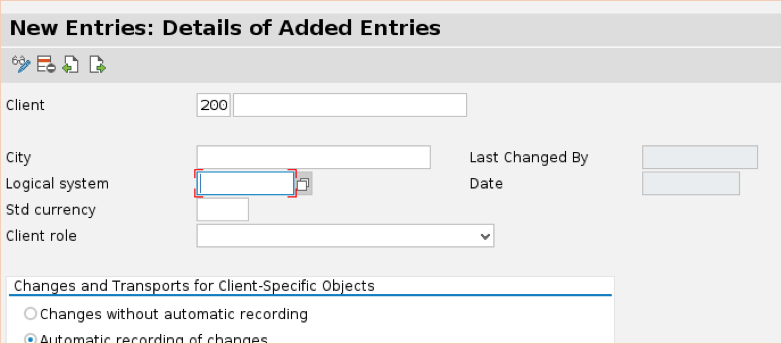
- Run transaction BD54 or SALE → Basic Settings → Logical System → Define Logical Systems, name all new clients and save.
- Run transaction SCC4 and assign the new logical system to the client using the logical system drop-down.
2) Disable fax and printing functionality in the QA systems
3) Lock all printers, excluding printer “LOCL”
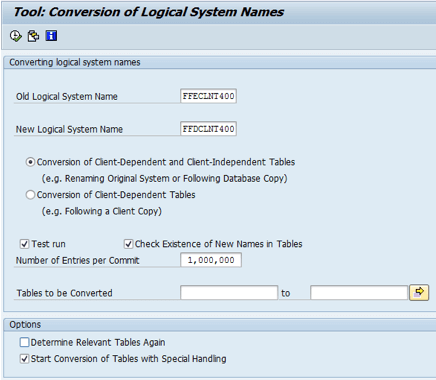
4) Run transaction BDLS
- Enter the logical system of the source system (where the copy came from) in the “Old Logical System Name” field.
- Enter the logical system of the destination system in the “New Logical System Name” field.
- To run a test, leave “Test Run” checked; to run in update mode, uncheck it.
5) Re-import transport requests (optional)
- Some transport requests may need to be imported a second time.
- Identify transports that moved to QA but have not moved to Production.
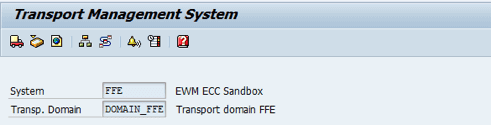
- Carry out this step via transaction STMS.
Our full system copy service also covers ERP-specific and EWM-specific settings and configuration after the copy. Contact us for details.
Ready to improve your warehouse operations?
Speak with one of our expert SAP logistics consultants at (404) 946-4035, or send us a note and we’ll get right back to you.